

What it takes to resell a hosted PBX.
Branding, the account hierarchy and call rating follow your sales chain: you, your resellers, their customers.
You are a telecom operator
You have your trunks, your numbers and your business customers. Kanadr adds the phone system to your offer, under your brand, installed on your infrastructure or hosted by us. Your resellers get their own space, with their customers and their price list.
You are an integrator
You already install your customers' network and phones. With Kanadr, you sell them the phone system too, under your brand: we host it for you, you connect the trunks of your SIP provider, and Yealink or Grandstream phones are provisioned remotely. Your customers change their hours and greeting themselves, without going through your support.
No minimum term, with a license minimum of $115 per month.
Full white label
Your name, color and logo on the portal, the sign-in page, the phone setup page, the phone in the browser and the iPhone and Android app. Emails go out from your server, and the user documentation only ever mentions “your operator”. Each customer has its own language: French and English included, others on request.
All your customers on one instance, each in their own space.
A single VM hosts hundreds of business customers. Each account has its own numbers, users, call flow, recordings, and its own brand for resellers. Nothing is visible from one account to another.
A second VM, and an outage no longer takes the phone system down.
A single VM is a single point of failure. Add a second one: the active VM carries a floating IP and serves calls, the passive VM keeps an up-to-date copy and takes over if the active one fails. Service is back in less than two minutes, and phones do not need to re-register.
A VM that can no longer reach its witness gives up the IP: never two active nodes. Calls in progress are lost, along with at most the last minute of voice messages.
Setup takes three commands. For an update: the passive VM first, a planned failover, then the other VM. If we host your platform, it is available as an option.
Customers, numbers and trunks.
Create a customer
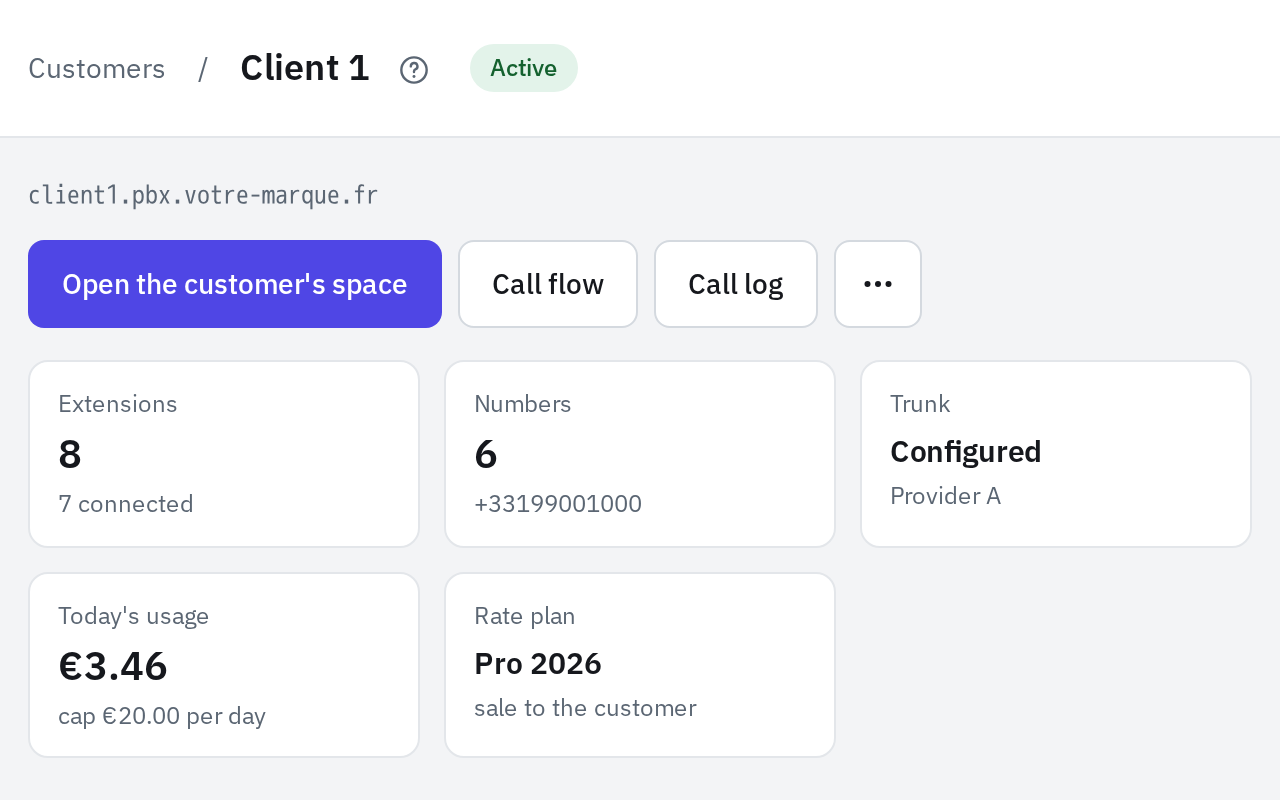
A name and a SIP domain; with a suffix set, the identifier is enough. Its users get their invitation by email. Its page sums up its connected phones, its numbers, its trunk, its usage for the day against the cap and its rate card.
Number inventory
CSV import, with country and provider, and numbers reserved for a reseller. Each number has a status: available, assigned, ported out, terminated.
One trunk per customer
With one profile per provider, the username, password and pilot number are all it takes. The trunk page shows the registration status and the code of the last rejection. Editing the profile updates all of its trunks.
The customer's space
You open a customer's portal as they see it, to help them out. A banner reminds you of it, and every action is logged under your name in the audit log.
Five account levels
Each level only sees and manages what sits below it.
Your whole base at a glance.
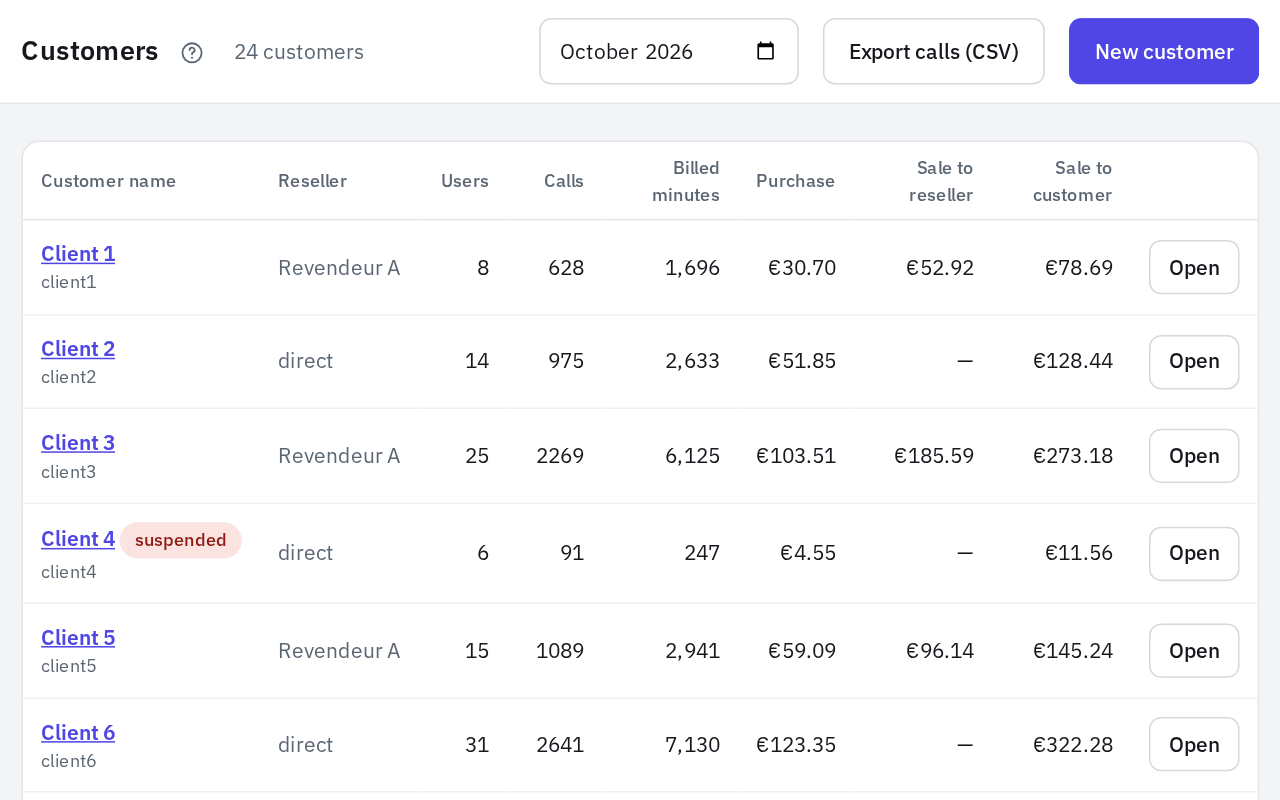
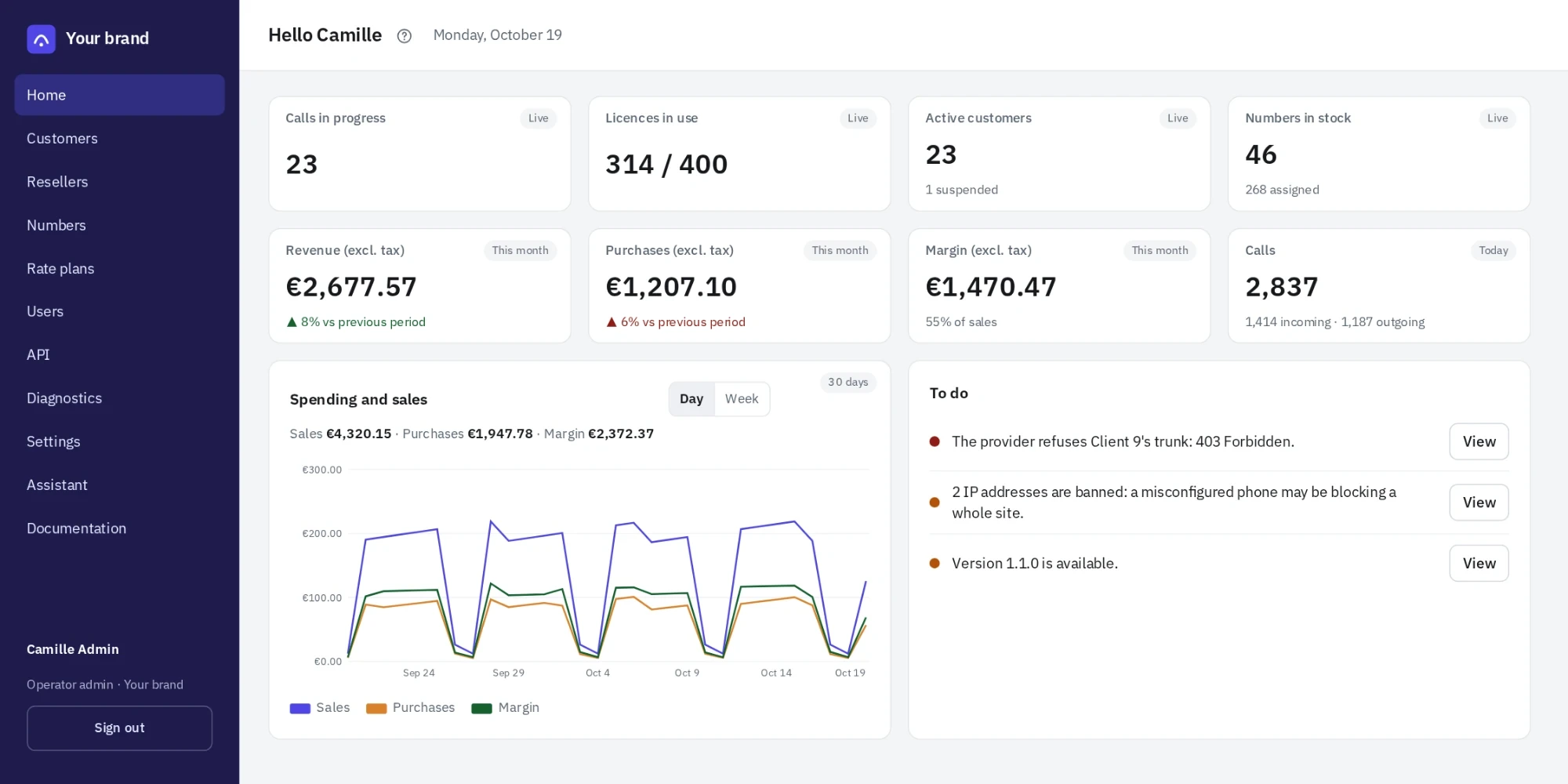
When they sign in, your team lands on a dashboard: what needs attention, the figures for your customer base and their trends. Every line leads to the page where you act.
Quality per provider shows the share of outgoing calls that connected, went unanswered or failed, with the most frequent causes. A provider whose failures are rising shows up before customers start complaining.
Every call rated, checked before billing.
Every answered outgoing call is rated as soon as it comes in, on three rate cards: your buy price, your price to the reseller, the price to the customer. A call forwarded to an outside number is rated as an outgoing call.
Rate cards are imported as CSV by prefix, with an effective date and a billing increment: per second, per minute, or first minute then every 30 seconds. A rate card can also be derived from another one with a margin, and an “other destinations” line covers whatever it does not list. Resellers never see your buy rates.
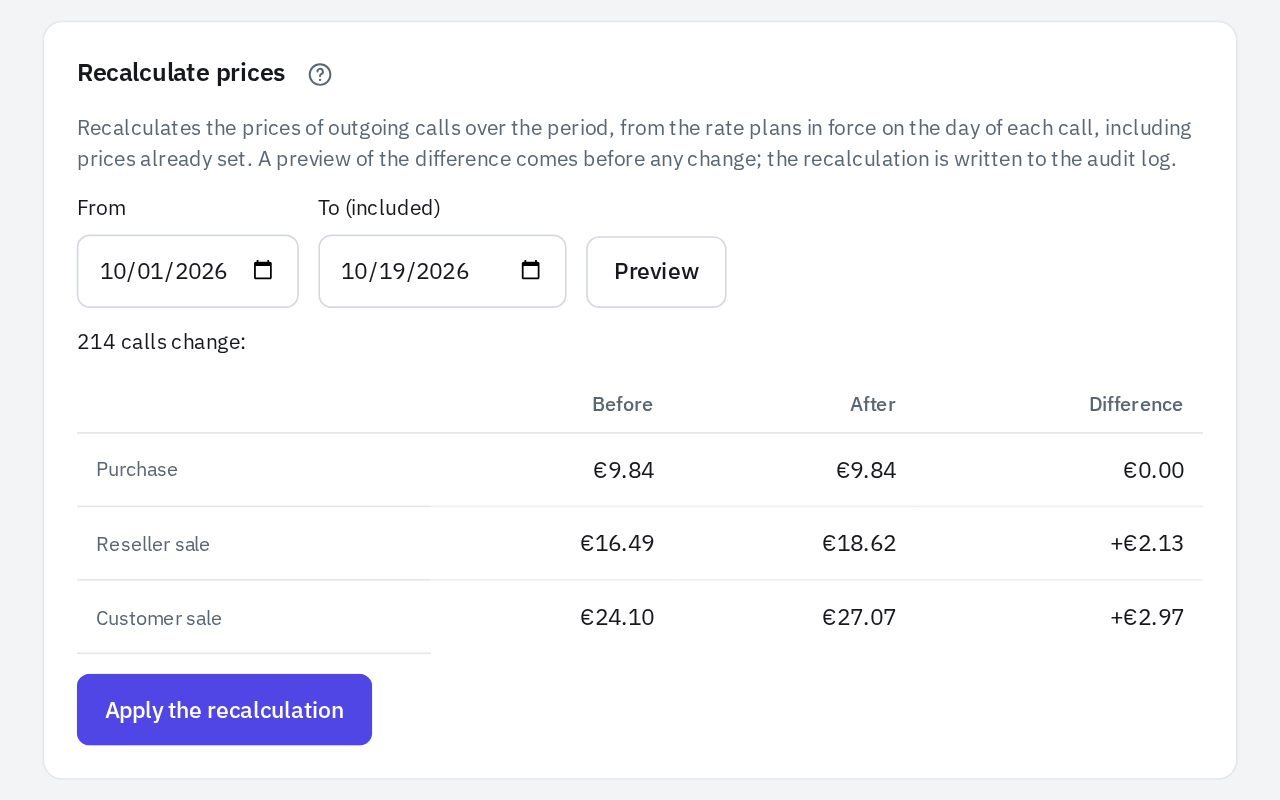
A rate card was wrong? Re-rating a customer over a period shows the total before, after and the difference, then applies on confirmation. It is recorded in the audit log.
Toll fraud stopped before the bill.
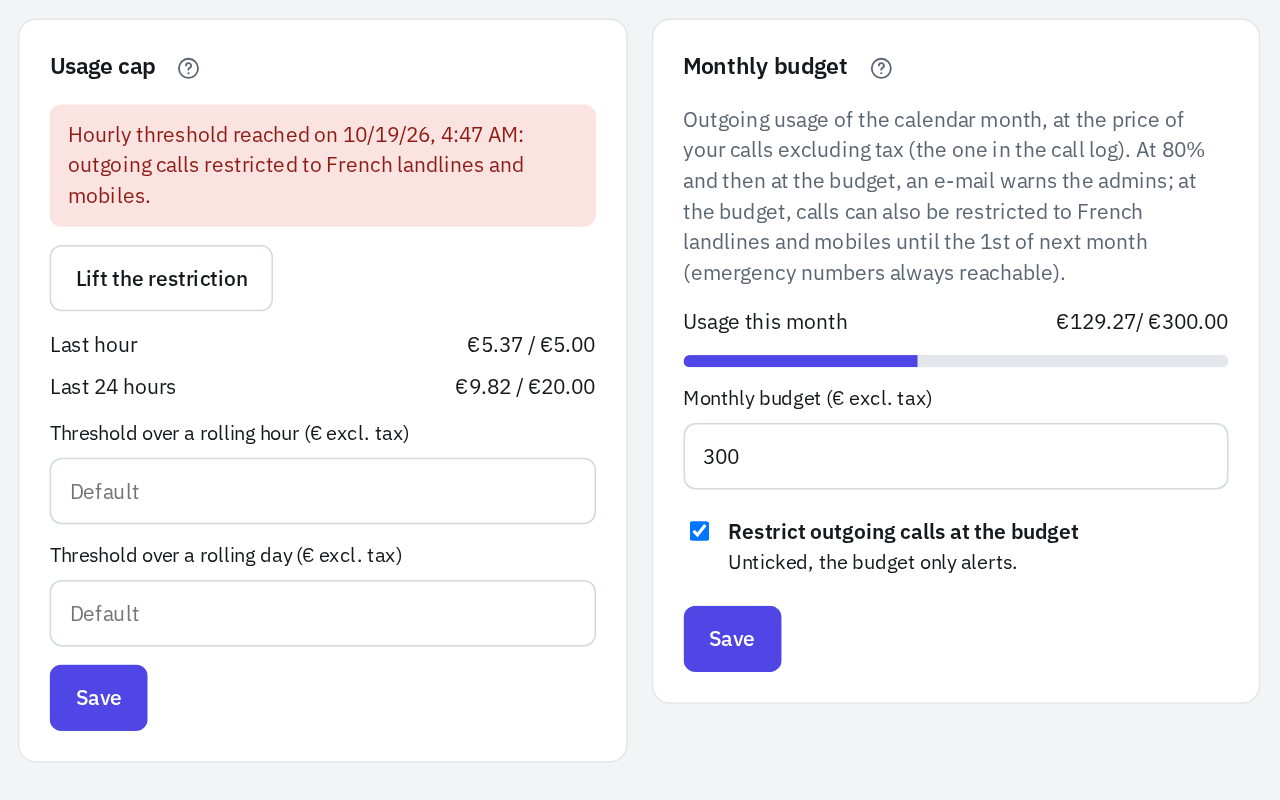
A hacked SIP account can call abroad all night long. Kanadr counts each customer's usage and restricts their outgoing calls before the bill runs away.
Ask your platform questions in plain language.
The MCP server connects Claude, ChatGPT, Le Chat or any MCP client to your instance. You ask the question, the assistant calls the API and answers.
It acts with your permissions, without being able to create accounts, API keys or any other access. Every change is recorded in the audit log, under your name and the application's.
Operator FAQ
What is Kanadr?
Kanadr is a white-label hosted PBX (IP Centrex) sold to telecom operators, integrators and resellers, not to businesses directly. The operator installs it on a Debian VM in its own infrastructure, or Kanadr hosts it for them. One VM serves all of the operator's customers, each fully isolated, and business customers only ever see the operator's brand.
Do my customers see the Kanadr brand?
No. With Kanadr, the portal, the sign-in page, the phone setup page, the browser phone and the iPhone and Android app carry your name, color and logo. Emails are sent from your own server, and the user documentation only refers to “your operator”. A reseller can have its own brand too.
How much does Kanadr cost for an operator or integrator?
The Kanadr license costs $1.75 per active user per month, excluding tax, with every feature included, a $115 monthly minimum and no minimum term. Suspended customers are not counted. Standard support adds 15% of the license, Premium 30% ($175 monthly minimum). Hosting by Kanadr is optional: $0.17 per user per month ($29 minimum), or $0.28 with a standby VM ($45 minimum).
How does Kanadr limit fraud on a hacked SIP account?
Kanadr tracks each customer's outbound spend, at your buy price, over a rolling hour and a rolling day: €5 and €20 by default, adjustable per customer. At the threshold, outbound calls are restricted to French landlines and mobiles, and emergency numbers stay reachable. An alert goes out at 80% of the threshold to the operator, the reseller and the customer's admins.
How are calls rated for billing?
With Kanadr, every answered outbound call is rated as soon as its record arrives, on three rate cards: the operator's buy price, the price to the reseller and the price to the customer. Rate cards are imported as CSV by prefix, with an effective date and a billing increment (per second, per minute, or first minute then 30-second steps). A CSV export feeds your billing, and resellers never see your buy prices.
Can Kanadr be managed from Claude or ChatGPT?
Yes. Kanadr includes an MCP server that connects Claude, ChatGPT, Le Chat or any MCP client to the operator's instance. The assistant queries the platform (trunk and extension status, spend caps, audit log) and answers in plain language, with the rights of the signed-in person. It cannot create accounts, API keys or access, and every change is written to the audit log.
Is Kanadr a unified communications (UCaaS) suite?
No. Kanadr only does business telephony: no video meetings, instant messaging or contact center. It runs on a single VM that is simple to operate, and customers configure their own phone system. If you need a full suite with video and contact center, Kanadr is not the right tool; if you want a reliable phone system your customers run themselves, it is.